
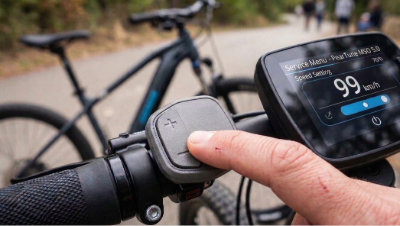
PearTune MSO chip versions 4.0 and 5.0 offer a unique possibility for individual settings directly via your e-bike's control buttons. Using the service menu, you can change speed limits, the chip's behavior after startup, or the method of displaying the distance traveled.
How to enter the service menu?
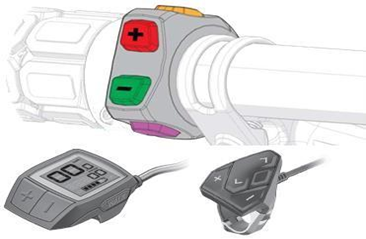
Entry into the menu is based on the exact number of presses of the assistance buttons (+ and -).
Rules for successful entry:
- Select the maximum assistance level (Turbo) on the display and wait at least 5 seconds.
- Perform the given number of presses (see table below).
- Important: The first press must always be the MINUS (-) button, then alternately + and -.
- Presses must not be too fast (the assistance level must actually switch on the display), but the delay between presses must not exceed 2 seconds.
- If the menu opens correctly, you will see a numerical value (in km/h) corresponding to the selected menu item on the display for 3 seconds.
Example: If you want to enter menu A (max. speed limit setting – 10 presses), go to the highest assistance, wait 5s, and perform 10 presses exactly like this: - + - + - + - + - +.
Menu Items Overview
|
Item |
Function |
Number of presses (starting with -) |
|
A |
Maximum speed setting |
10x |
|
B |
Chip lock |
13x |
|
C |
Chip startup (status after turning on the bike) |
15x |
|
D |
Correcting the number of kilometers traveled |
17x |
|
E |
Chip reset |
19x |
|
F |
Chip activation (button selection) |
21x |
|
G |
Chip software version information |
23x |
Detailed Description of Settings and Values
(Note: Menu item values in brackets apply only to Bosch SMART System motors)
A: Max. speed (10x press)
The display shows the currently set maximum speed, which you can change using the - and + buttons to your desired maximum speed (26 to 60 km/h in 1 km/h increments; a value of 99 km/h indicates an unlimited max. speed). After 10s of inactivity, the selected speed is automatically saved, and the service menu closes.
B: Chip lock (13x press)
The chip cannot be activated by any button. A quick chip lock can be triggered by pressing assistance + and - 8 times.
- 1 (11) – chip lock ON
- 2 (12) – chip lock OFF
- 3 (13) – quick chip lock ON
- 4 (14) – quick chip lock OFF
C: Chip startup (15x press)
Determines the status of the chip immediately after turning on the e-bike.
- 1 (11) – the chip is ACTIVE after turning on the bike – the chip activates automatically upon power-up (subsequently, the chip can no longer be deactivated by pressing any button).
- 2 (12) – the chip is ACTIVE after turning on the bike – the chip activates automatically upon power-up (subsequently, the chip can be deactivated at any time by pressing one of the buttons on the display).
- 3 (13) – the chip is INACTIVE after turning on the bike (subsequently, the chip can be activated at any time by pressing one of the buttons on the display).
D: Correcting the number of kilometers traveled (17x press)
The distance traveled while the chip is on does not match the actual distance traveled. This item allows the user to choose the calculation method that is most comfortable during the ride. Indication of an ongoing calculation when stopped is first displayed as 5 km/h for 20s (information that the calculation will follow) and then by decreasing values from 20 km/h down to 10 km/h. A value of 0 km/h indicates that the calculation is finished and the distance is displayed correctly.
- 1 (11) – kilometer addition during the ride and when stopped (NOT RECOMMENDED !!!)
- 2 (12) – kilometer addition only when stopped
- 3 (13) – no distance addition
- 4 (14) – stopping kilometer addition using (+-) ENABLED (ON)
- 5 (15) – stopping kilometer addition using (+-) DISABLED (OFF)
E: Chip reset (19x press)
Use, for example, in case of installing the chip on a different bike or when replacing the speed sensor.
- 1 (11) – chip settings remain preserved
- 2 (12) – reset chip to default (factory) settings
F: Chip activation (21x press)
Selection of buttons you want to use to activate/deactivate the chip (some settings are non-functional on certain motor types).
- 1 (11) – assistance change (+ and - buttons) ENABLED (ON)
- 2 (12) – assistance change (+ and - buttons) DISABLED (OFF)
- 3 (13) – walk assist button ENABLED (ON)
- 4 (14) – walk assist button DISABLED (OFF)
- 5 (15) – light button 1x ENABLED (ON)
- 6 (16) – light button 1x DISABLED (OFF)
- 7 (17) – light button 2x (short 1s press) ENABLED (ON)
- 8 (18) – light button 2x (short 1s press) DISABLED (OFF)
- 9 (19) – light button 2x (long 5s press) ENABLED (ON)
- 10 (20) – light button 2x (long 5s press) DISABLED (OFF)
- 11 (21) – chip activation/deactivation indication on the display ENABLED (ON)
- 12 (22) – chip activation/deactivation indication on the display DISABLED (OFF)
- 13 (23) – COBI control unit ENABLED (ON)
- 14 (24) – COBI control unit DISABLED (OFF)
- 15 (25) – chip activation by changing assistance (+ -) while riding ENABLED (ON)
- 16 (26) – chip activation by changing assistance (+ -) while riding DISABLED (OFF)
- 22 (32) – settings without change
G: Chip software version information (23x press)
Displays the chip's SW version on the display – the SW version will be written out sequentially: the first digit appears for 3s, then changes to zero (representing a dot), followed by the middle digit for 3s, then changes to zero (dot), and finally the last digit for 3s, then changes to zero (dot). This number will be in the format xx.xx.xx.
Saving Confirmation: As soon as you make a change in any menu, the last selected value is saved to the chip if you do not change it for 10 seconds. Confirmation of the save is indicated by a 0 km/h value appearing on the display.