
News

List of articles

We are launching a new generation of the PearControl e-shop for you


A more modern environment, faster shopping and your individual prices

Dear customers,

In recent weeks, we have been testing the new generation of our e-shop in a small circle. Thanks to feedback from the first users, we have fine-tuned the details and now the time has come:
We are now launching the new PearControl e-shop for all our partners.

Our goal was to simplify your everyday ordering and bring the features you've been asking for.

What can you look forward to in the new environment?

  • Your tailored B2B account: You automatically see your wholesale prices corresponding to your subscriptions.
  • Faster payments: We now support Apple Pay , Google Pay , PayPal 
  • Flexible transport: Wider choice of carriers including delivery to pick-up boxes and the option of own transport
  • Better overview: Detailed order status tracking and automatic notifications.
  • Friendlier shopping: Intuitive categorization and a complete portfolio of over 130 products.
  • News section: This will include a more detailed description of functionalities, planned product changes or new product launches, and other information from the e-bike industry.

A small request: Although we have carefully tested the e-shop, a minor "childhood illness" may appear during live operation. If you encounter an error or have an idea for improvement, please let us know at info@pear-control.com . Your feedback is crucial to us.

How to log in for the first time?

To make the transition easier for you, we have automatically created a registration for you in the email address you received this message from.

  1. At the top right, click the person icon .
  2. Select the "Forgot Password" option .
  3. After setting your own password, you log in and immediately see your individual prices.

Do you need to register additional colleagues or different email address ? Simply make a new registration and we will then manually assign your company price list to it.

What are we planning next?

We don't stop there. We have more improvements coming soon:

  • Multiple language versions and foreign currencies for international trade.
  • Easy download of product sheets and installation manuals directly from the product.
  • Automated preparation of tax documents and a system for lightning-fast claims.
  • Product reviews
  • Chat assistant for easier product selection and installation questions


ENTER THE NEW E-SHOP

If you are unsure about anything when placing your first order, we are here for you on the phone +420 775 165 822 .

Thank you for growing with us.

Kateřina & the PearControl team


How to Select the Correct Tuning Chip


The range of drive units is constantly evolving, and selecting the right chip might seem complex at first glance. However, for the tuning to function correctly, it must be fully compatible with your bike's electronics. With our guide, you can handle this process in just a minute.

  1. Identify the Drive Unit Manufacturer

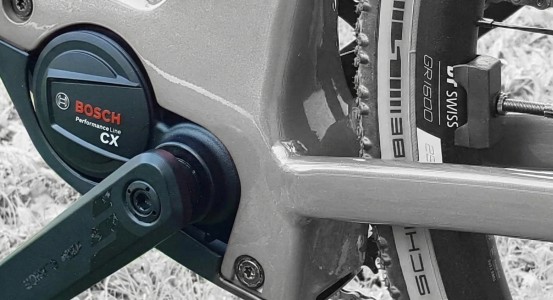
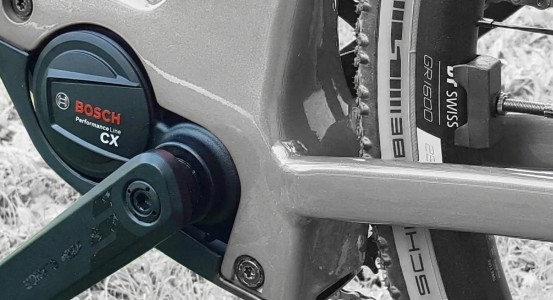
This is the fundamental step. Check the bottom bracket area of your bike. Most commonly, you will see logos such as 
BoschBafangBroseFazuaGiantOliPanasonicSachs, ShimanoSpecializedSramTQ, Yamaha 
Based on this brand, select the main category in our e-shop.

  1. Determine the Model and Generation (Model Year)

This is where errors occur most frequently. It is insufficient to simply know you have a "Bosch" system. You must distinguish whether it is an older model (e.g., Active Line), the classic Performance Line CX (Gen 4), or the latest Smart System.

  • Check the manual: The exact drive unit type is always listed in the bike's documentation.
  • Visual inspection: Compare the shape of your motor with the product images on our website. Different generations often feature distinct housing shapes.
  • Check the connectors: The crucial difference often lies in the connectors (color and pin count) located under the motor cover.
  1. Identify the Display Type

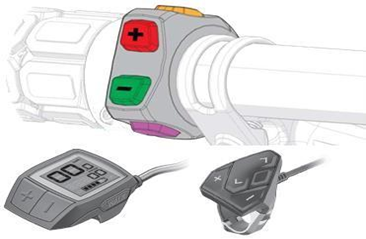
Certain chips are activated via handlebar controls (Walk, +/-, etc.). Therefore, it is essential to identify your display model (e.g., Kiox 300, Intuvia, Purion). For some drive systems (e.g., Yamaha), the display type is a critical factor for chip compatibility.

Still Not Sure?

Your e-bike dealer can certainly assist you in identifying the specific drive unit type. Some dealers cooperate closely with us and are ready to install the PearTune MSO chip for you. Ask them about their pricing and installation terms.

If you cannot consult your dealer, simply send us a photo. If you remain uncertain even after checking the points above:

  1. Take your mobile phone.
  2. Take a photo of the motor detail (from the left side), the display, and ideally the label on the frame indicating the model year.
  3. Send the photos to our email at info@pear-control.com  or via our WhatsApp chat.

We will help you accurately identify your drive system and immediately send you a link to the correct tuning chip.


How to choose a chip version?

How to choose the right PearTune MSO chip version?

All our chips reliably remove the 25 km/h speed limit. The differences between the versions lie in the level of control comfort and the range of available settings. Choose the one that best suits your riding style:

PearTune MSO 3.0 Still ON (Carefree Riding)
The ideal choice for those who don't want to worry about a thing.

  • Function: The chip is permanently active after installation.
  • Advantage: No button pressing, no activation before the ride. Just get on and ride without limits.

PearTune MSO 3.0 Normal (The Proven Classic)
The golden middle ground for riders who want the power of choice.

  • Function: You can turn the chip on or off at any time using the buttons on your e-bike's display (e.g., light buttons or Walk Assist).
  • Advantage: Turn the chip off for road traffic and activate it with a single press when you hit the trails.

PearTune MSO 4.0 (Smart Settings – Most Popular)
Our best-selling version for demanding users who want everything under control.

  • Function: Offers everything the 3.0 version does, but adds the ability to adjust settings directly via the bike's display.
  • Advantage: You can set your own maximum speed limit (e.g., to 32 km/h to save battery), change the activation button combination, or "lock" the chip via software (it then appears inactive).
  • A more detailed description of the benefits of this best-selling variant, including instructions for the chip's service menu, can be found here: 

PearTune MSO 5.0 Remote Control (Absolute Control)
The top-tier range for maximum discretion and lightning-fast reaction.

  • Function: Adds an external remote control to all the advanced features of version 4.0.
  • Advantage: You can immediately deactivate the chip or restore it to factory settings using the remote control without having to touch the bike's display. A premium solution for maximum safety and peace of mind.
Service Menu and Advanced Settings for PearTune MSO Chips version 4.0 and 5.0

PearTune MSO chip versions 4.0 and 5.0 offer a unique possibility for individual settings directly via your e-bike's control buttons. Using the service menu, you can change speed limits, the chip's behavior after startup, or the method of displaying the distance traveled.

How to enter the service menu?

Entry into the menu is based on the exact number of presses of the assistance buttons (+ and -).

Rules for successful entry:

  1. Select the maximum assistance level (Turbo) on the display and wait at least 5 seconds.
  2. Perform the given number of presses (see table below).
  3. Important: The first press must always be the MINUS (-) button, then alternately + and -.
  4. Presses must not be too fast (the assistance level must actually switch on the display), but the delay between presses must not exceed 2 seconds.
  5. If the menu opens correctly, you will see a numerical value (in km/h) corresponding to the selected menu item on the display for 3 seconds.

Example: If you want to enter menu A (max. speed limit setting – 10 presses), go to the highest assistance, wait 5s, and perform 10 presses exactly like this: - + - + - + - + - +.


Menu Items Overview

Item

Function

Number of presses (starting with -)

A

Maximum speed setting

10x

B

Chip lock

13x

C

Chip startup (status after turning on the bike)

15x

D

Correcting the number of kilometers traveled

17x

E

Chip reset

19x

F

Chip activation (button selection)

21x

G

Chip software version information

23x


Detailed Description of Settings and Values

(Note: Menu item values in brackets apply only to Bosch SMART System motors)

A: Max. speed (10x press)

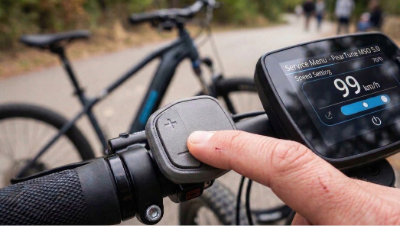
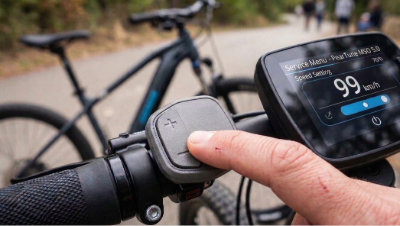
The display shows the currently set maximum speed, which you can change using the - and + buttons to your desired maximum speed (26 to 60 km/h in 1 km/h increments; a value of 99 km/h indicates an unlimited max. speed). After 10s of inactivity, the selected speed is automatically saved, and the service menu closes.

B: Chip lock (13x press)

The chip cannot be activated by any button. A quick chip lock can be triggered by pressing assistance + and - 8 times.

  • 1 (11) – chip lock ON
  • 2 (12) – chip lock OFF
  • 3 (13) – quick chip lock ON
  • 4 (14) – quick chip lock OFF

C: Chip startup (15x press)

Determines the status of the chip immediately after turning on the e-bike.

  • 1 (11) – the chip is ACTIVE after turning on the bike – the chip activates automatically upon power-up (subsequently, the chip can no longer be deactivated by pressing any button).
  • 2 (12) – the chip is ACTIVE after turning on the bike – the chip activates automatically upon power-up (subsequently, the chip can be deactivated at any time by pressing one of the buttons on the display).
  • 3 (13) – the chip is INACTIVE after turning on the bike (subsequently, the chip can be activated at any time by pressing one of the buttons on the display).

D: Correcting the number of kilometers traveled (17x press)

The distance traveled while the chip is on does not match the actual distance traveled. This item allows the user to choose the calculation method that is most comfortable during the ride. Indication of an ongoing calculation when stopped is first displayed as 5 km/h for 20s (information that the calculation will follow) and then by decreasing values from 20 km/h down to 10 km/h. A value of 0 km/h indicates that the calculation is finished and the distance is displayed correctly.

  • 1 (11) – kilometer addition during the ride and when stopped (NOT RECOMMENDED !!!)
  • 2 (12) – kilometer addition only when stopped
  • 3 (13) – no distance addition
  • 4 (14) – stopping kilometer addition using (+-) ENABLED (ON)
  • 5 (15) – stopping kilometer addition using (+-) DISABLED (OFF)

E: Chip reset (19x press)

Use, for example, in case of installing the chip on a different bike or when replacing the speed sensor.

  • 1 (11) – chip settings remain preserved
  • 2 (12) – reset chip to default (factory) settings

F: Chip activation (21x press)

Selection of buttons you want to use to activate/deactivate the chip (some settings are non-functional on certain motor types).

  • 1 (11) – assistance change (+ and - buttons) ENABLED (ON)
  • 2 (12) – assistance change (+ and - buttons) DISABLED (OFF)
  • 3 (13) – walk assist button ENABLED (ON)
  • 4 (14) – walk assist button DISABLED (OFF)
  • 5 (15) – light button 1x ENABLED (ON)
  • 6 (16) – light button 1x DISABLED (OFF)
  • 7 (17) – light button 2x (short 1s press) ENABLED (ON)
  • 8 (18) – light button 2x (short 1s press) DISABLED (OFF)
  • 9 (19) – light button 2x (long 5s press) ENABLED (ON)
  • 10 (20) – light button 2x (long 5s press) DISABLED (OFF)
  • 11 (21) – chip activation/deactivation indication on the display ENABLED (ON)
  • 12 (22) – chip activation/deactivation indication on the display DISABLED (OFF)
  • 13 (23) – COBI control unit ENABLED (ON)
  • 14 (24) – COBI control unit DISABLED (OFF)
  • 15 (25) – chip activation by changing assistance (+ -) while riding ENABLED (ON)
  • 16 (26) – chip activation by changing assistance (+ -) while riding DISABLED (OFF)
  • 22 (32) – settings without change

G: Chip software version information (23x press)

Displays the chip's SW version on the display – the SW version will be written out sequentially: the first digit appears for 3s, then changes to zero (representing a dot), followed by the middle digit for 3s, then changes to zero (dot), and finally the last digit for 3s, then changes to zero (dot). This number will be in the format xx.xx.xx.

Saving Confirmation: As soon as you make a change in any menu, the last selected value is saved to the chip if you do not change it for 10 seconds. Confirmation of the save is indicated by a 0 km/h value appearing on the display.

Finally, a 100% Functional Solution for Bosch with RIM magnet


After intensive development and rigorous real-world testing, we are launching a solution the market has long been waiting for. Our new PearTune MSO line for Bosch Smart System motors with RIM magnet (CX and SX variants) brings stability and performance where other solutions fail.

Why choose PearTune MSO?

  • fully compatible with the latest version of Bosch software
  • speed limit completely removed
  • true speed display after the decimal point
  • no additional km and no need to wait to turn off the ebike
  • fully functional with the Bosch Ebike Flow app
  • automatic calibration and adaptation of the chip to the e-bike
  • extremely small size for easy installation
  • fully compatible with the GPS module from Bosch: Bosch connect module

Available variants for your orders:

Due to high interest in the first production series, we recommend ordering early and maximum 10 pcs.  Our goal is to ensure a steady supply for all B2B partners. If anyone is interested in a larger number, please contact us by email or phone.

Place your order here

E-Bike Speed Limits Explained

E-Bike Speed Limits Explained

Want to Unleash Your E-Bike’s Full Potential? Read This Guide on Legislation First

Every e-bike owner knows the feeling. You are cruising along a flat road, leaning into the pedals, enjoying the acceleration, and then suddenly... it feels like someone grabbed your saddle from behind. The speed limiter has kicked in—cutting off motor assistance the moment you hit the factory-set limit (usually 25 km/h in Europe, or around 20 mph in other regions).

This is exactly why we manufacture our tuning chips—so that nothing holds you back.

However, as a fair manufacturer and retailer, we want you to enjoy your ride not only with full power but also with peace of mind and clear information. E-bike tuning is a technically fascinating modification, but it comes with specific legal rules that vary by country. Here is what you need to know.

What Does the Law Say?

Regulations regarding e-bikes differ significantly across the globe.

  • In the European Union: Legislation (specifically standard EN 15194) defines a road-legal e-bike as having a motor output of up to 250 W and assistance that cuts off at 25 km/h.
  • Outside the EU (e.g., USA, Canada, Australia): Limits may be higher (often 20 mph / 32 km/h or even 28 mph / 45 km/h for certain classes).

The key takeaway: Regardless of your local limit, our tuning chips are designed to remove this barrier entirely. Once the e-bike exceeds the speed limit defined by your country’s legislation due to the chip, it legally ceases to be a "bicycle." Instead, it technically falls into the category of mopeds, motorcycles, or unregistered motor vehicles.

Does This Mean I Cannot Buy a Chip?

Not at all. The sale, purchase, and possession of a tuning chip are completely legal. Our chips are high-end electronic components designed to unlock the hardware potential of your bike’s motor. The crucial factor is where you choose to ride your modified bike.

By installing the chip, you acknowledge that you will operate your e-bike outside of public roads and infrastructure.

Where Can I Enjoy the Ride?

With the chip activated, a world of unrestricted riding opens up to you in places where general road traffic regulations do not apply. Your new playground includes:

  • Private property and land.
  • Closed racing circuits and sport tracks.
  • Designated off-road trails specifically reserved for training/racing away from public networks.

On public roads, cycle paths, or in city traffic, you should always keep the chip deactivated (or removed) to ensure your bike meets legal requirements. Otherwise, you risk fines during police checks or significant complications with your insurance company in the event of an accident.

Freedom with Responsibility

Our chips give you (and your legs) higher power and speed. However, this comes with greater demands on your skills and your bike's components. Remember that braking distances increase at higher speeds, and other people (even off-road) may not correctly estimate how fast you are approaching. Please ensure your brakes are in perfect condition, always wear a high-quality helmet, and ride considerately.

Unlock your e-bike’s potential and enjoy the adrenaline where it belongs. We supply the best technology; the decision of where to press the "start" button is up to you.


Lifetime Warranty

Starting in 2026, we are offering a FREE LIFETIME WARRANTY on all  PearTune MSO chips sold within the European Union.

When you buy a premium product, you expect premium reliability. At PearTune, we don’t just sell MSO chips; we develop and manufacture them ourselves. We know exactly what is inside. We know that we use the highest quality components designed to withstand humidity, vibrations, and temperature fluctuations.

That is why we have decided to take a radical step that changes the rules of the game. Forget about the standard two-year warranty period. For us, it no longer exists.

What does this mean for you?

All orders placed from January 1, 2026, for delivery within the EU, automatically include our Lifetime Warranty.

  • No Hidden Fees: You don’t have to pay extra for peace of mind in your shopping cart. With us, it is standard.
  • No Registration Required: You do not need to fill out any forms to activate the warranty. Your invoice is your ticket.
  • Instant Replacement: If the chip stops working at any time in the future due to an electronic defect, we won’t waste time with complicated repairs. We will immediately send you a brand-new piece.

How are we different?

While some retailers offer a lifetime warranty as a paid add-on or subject it to complex conditions and fine print, we choose the path of absolute transparency.

We believe that tuning should serve you for the entire lifespan of your e-bike. If the chip fails—whether in 3 years or 10 years—it is our responsibility, not yours.

How does it work?

It is simple. If your chip stops working:

  1. Contact us at info@pear-control.com or call +420 775 165 822.
  2. Send the non-functional chip along with your proof of purchase and a brief description of the fault to our address:
    PearControl Příkopy 1889 393 01 Pelhřimov Czech Republic
  3. We will immediately send a new chip back to your address.

Ride to the fullest. We will take care of the technology. Forever.


Listing controls

7 items total